CI/CD ·
Cloud CI/CD lets you throw money out the window
 Koen Van Looveren
If you build iOS apps and pay for a cloud CI service, you have probably asked yourself: why am I spending this much, just to run builds? We asked the same at impaktfull. Then we did something about it.
The problem with cloud CI
Cloud CI/CD platforms are convenient, but they come with:
- High costs, especially for macOS runners: on GitHub a macOS minute costs about ten times a Linux minute.
- Queues: waiting for a free runner before your build even starts.
- Limited customisation of the machine and its tools.
- No persistent environment: every build installs and caches everything again.
It hurts most when you iterate fast and push several builds a day.
Mac minis with self-hosted GitHub runners
We switched to self-hosted GitHub Actions runners on Mac minis. The result:
- As many builds a day as we want, without paying per minute.
- No waiting in a queue.
- A fixed, one-time hardware cost.
- Full control over the tools and their versions.
In return you look after the machines yourself: power, macOS and Xcode updates, and the occasional reboot. And only use self-hosted runners for private repositories: GitHub advises against them for public ones, because anyone could run code on your machine through a pull request.
The only hurdle: setting up each machine by hand was slow, error-prone and boring.
That is why we built impaktfull_cli
To automate that setup and make every machine the same, we built impaktfull_cli: a CLI that turns a clean Mac into a CI-ready machine. Install it:
curl -fsSL https://cli.impaktfull.com/install.sh | bashThen run one command:
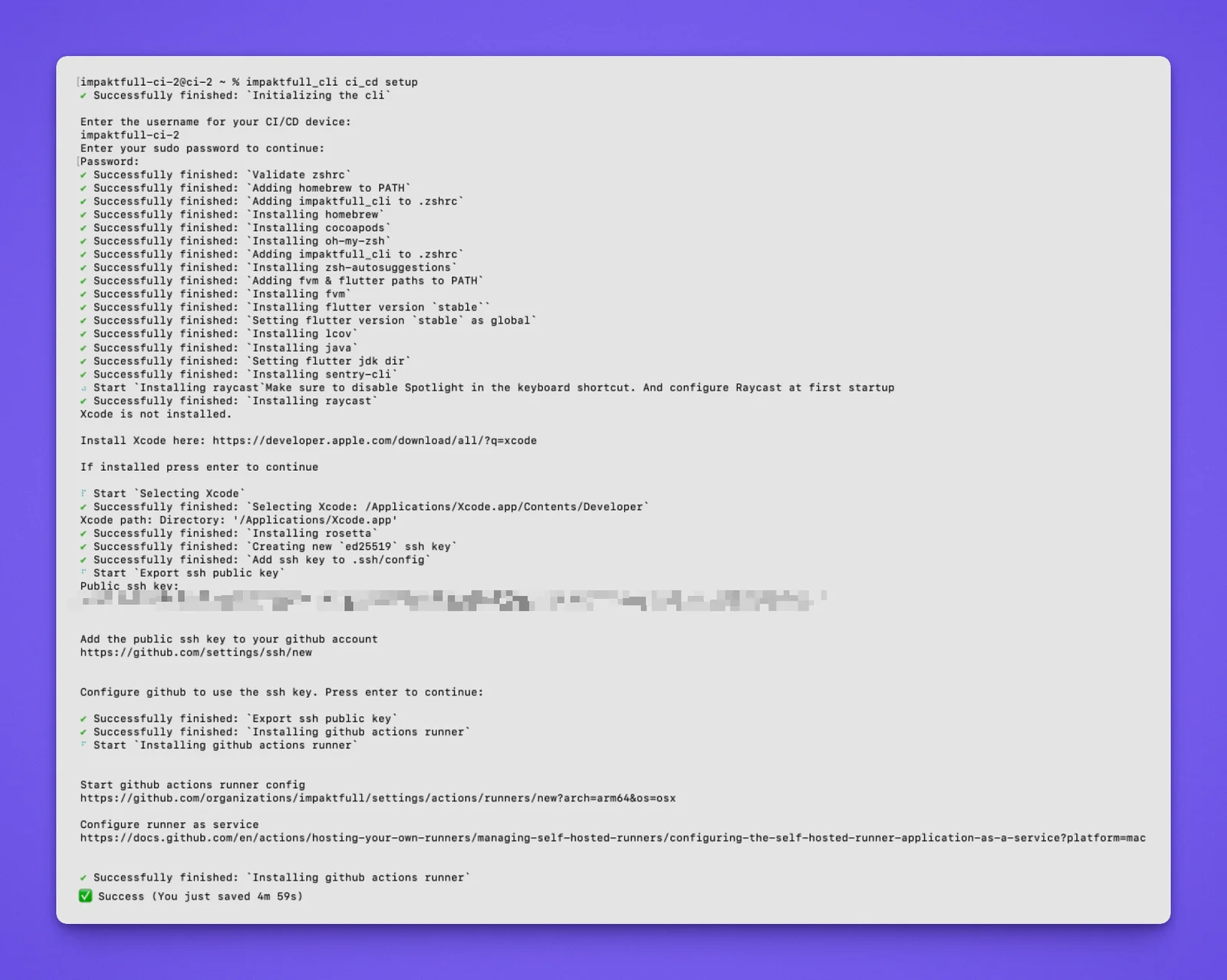
impaktfull_cli ci_cd setupThat command:
- installs and configures Homebrew, CocoaPods, FVM and Flutter;
- installs Java, lcov, Rosetta and sentry-cli, and points Flutter to the right JDK;
- sets up a working Zsh environment with autosuggestions;
- helps you select Xcode;
- creates an SSH key and tells you where to add it on GitHub;
- installs the GitHub Actions runner and registers the machine as a self-hosted runner.
Transparent, step by step
You run one command, but the CLI logs every step: what it installs, which configuration files it changes, and how it sets paths and environment variables. You stay in control; it does the boring part.
Why it works for us
- No cost per build minute: the machines are paid for once.
- As many runners as we need, without licences per runner.
- Freedom to set up the CI environment exactly as our projects need it.
- Every machine the same, so a build that works on one works on all.
Once Xcode is installed, a new Mac mini is ready in about five minutes. More on why we build our own CLIs.
Try it
Using GitHub Actions and want lower CI costs? Get started on GitHub, on pub.dev or in the documentation. And if you would rather have it set up for you: we set up builds and releases like this for every app we make.